My experience with Three

Back in September of last year I posted an entry asking if 3 was better than 2. After testing with a MiFi since then I decided that Three probably was better than O2 so took the plunge and moved my iPhone number to them.

Rather than put myself into a long term contract I selected the £15 per month Sim Only option which more than covers my needs.

  • 300 any network minutes
  • 3000 texts
  • 1GB internet
  • 1 month rolling contract

I have to say that out and about the service was great, internet tethering was fantastic and download speeds were pretty much not far off my broadband speed :o I was very happy indeed.

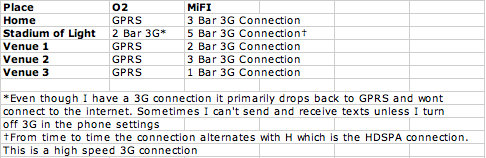
However, the signal I got at home (where I spend a lot of time) was far from ideal. One bar was pretty much all I was provided with and the phone frequently went from 1 bar to No Service. A tweet about it resulted in a tweet from Three who tried to help me out, ultimately I needed to call customer services in order to discuss the issue.

Customer services immediately put me through to the “iPhone team” who advised me restore the phone  to factory defaults – well I did that but it made no difference at all. The customer service team then advised me to test the connection in several other locations and that if that still failed then I would have to take it to Apple as it would be a handset fault!.

Again, out and about it was great but indoors it was diabolical. Now to be fair to Three, the locations I tested O2 don’t always have a 3G connection but if they don’t it will go to an Edge or GPRS signal so at least I won’t lose signal and be unable to make calls. This is where Three fails to hit the mark for me.

The last straw for me was when my wife tried to call me when I was visiting relatives. My daughter was badly hurt but even though I had one bar it failed to connect the call and she had to call me via my brothers mobile.

After checking out alternatives I decided to go with Giff Gaff (Referral Link). As it runs on the O2 network, I know it’s coverage so can be assured that, apart from when being at the Stadium of Light, I will get a signal when I need to. I am only a couple of weeks using Giff Gaff but so far it’s been great  and it’s also incredibly priced £10 per month gives me 250 minutes, unlimited texts and unlimited internet usage! (though does need to be set up for Internet and MMS usage – more on that on my next post).

Although I have lost tethering I still have a Three MiFi which I will use from time to time when I don’t have a 3G connection on Giff Gaff or when I need to connect my laptop to the internet when out and about.

Thinking about joining Giff Gaff? Click this referral link, you will get a free sim with free £5 credit and I will get some referral points ;)

Get a free Giffgaff Sim

Posted in iPhone at August 9th, 2011. No Comments.

Is 3 better than 2?

Since the original Apple iPhone came out back in 2007 I have always been with O2.

Having signed up for a 18 Month contract with the Original iPhone I was over the moon with O2 when they allowed me to upgrade to the iPhone 3G when it was released by Apple and duly purchased the iPhone 3G and more recently the awesome iPhone 4. In the beginning every thing was fine, 3G internet access, calls, text everything worked perfectly.

However, things started to go wrong last year with O2. Their 3G network was terrible for internet access whenever I was at the football. What I could not understand was why one season it was ok and the next it wasn’t  so blamed it on a combination of the Stadium of Light and O2! After asking my followers on twitter who they were using and their experiences I discovered a bit of a pattern :

O2 – Woeful once at the Stadium
Orange – Not as bad but does fail
Vodafone – As Orange
Three – No feedback
T Mobile – No feedback

So I guess that there were simply too many people in one location for the mobile operators to cope with.

Recently on twitter a couple of people had mentioned a Three MiFi and how they use it as an alternative connection to O2 as they could get a better connection whilst on the road or wanted an internet connection for their iPad whilst out of range of a WiFi network.

As I have not been happy with O2 for sometime due to their connectivity problems I decided to purchase a PAYG MiFi from Three in order to trial the Three network and see what it’s like compared to O2. After checking the pricing I opted to buy a MiFi with 3Gb data which lasts 3 months on PAYG, and costs £69.99, so that I can “trial” the Three network and see what it is like. I also used topcashback.co.uk (referral link) to get £12.00 off the cost.

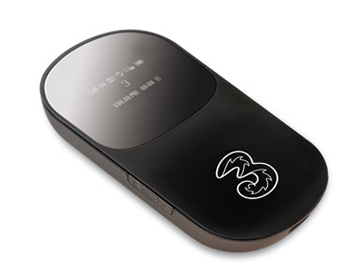
MiFi

For those which don’t know what a MiFi is it’s basically a 3G dongle with built in WiFI, this clever little device allows up to 5!! devices to share a 3G connection on the Three mobile network. You can either get the MiFi on a 12 month contract or on a PAYG basis.

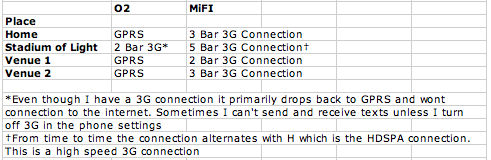
As you can see from the information above the MiFi on Three is MUCH better than O2′s network on my iPhone. I suspect that the O2 network simply cannot cope with the the massive increase in smart phones, be it Apple iPhone’s, Andriod driven phones or even those strange Windows driven things ;)

So far in my testing the Three network seems far superior to O2′s and once my contract expires in June 2011 I will be migrating to Three with my next iPhone!

Posted in Football, iPhone, SAFC at September 21st, 2010. 1 Comment.

TomTom? More like LOST TOM!

On two recent trips I decided to use TomTom for iPhone instead of my standard TomTom and very stupidly I left my my standard unit at home.

Driving around Edinburgh it was losing GPS signal, putting me on roads no where near I was and lagging so badly behind that it was really difficult to take the right turnings when they were really close together. We resorted to using Google Maps to route ourselves to our destination.

Obviously the limitation is with the iPhone rather than with TomTom hence them saying you need to have the car kit WHICH YOU CANNOT BUY YET!

Really wish I had not bought this, I feel ripped off and will be firing off an email to them as they simply should not have released this without the car kit.

Posted in iPhone at September 23rd, 2009. 1 Comment.

ShrinkURL for iPhone

Paul Carmody, @macjasp on Twitter, has created an iPhone App called ShrinkURL, (Site, iTunes) which can shorten url’s using the tinyurl.com service.

When posting links on Twitter nearly everyone uses a link shortening service in order to cram as much as they can into the 140 character limit, for example my quick review of TomTom for iPhone is 56 characters long (http://www.g4shallow.co.uk/2009/08/17/tomtom-for-iphone/) but using tinyurl this is shortened to 25 characters http://tinyurl.com/n39zom

In the images shown below I have copied the URL http://www.macjasp.com/2009/08/shrinkurl-for-iphone.html from Safari

Then launched ShrinkURL

and voilà the shortened url is copied back to the iPhone clipboard. For me this is extremely useful in order to shorten links ready to paste into Tweetie.

You can also type a URL in the application itself and click on the go button which will then shorten the URL and copy that to your clipboard. If you have non-url text in your clipboard when you open ShrinkURL you will see the following error so links that don’t work are not created ;)

Of course some people will have personal preferences on which shortening service they use such as bit.ly, is.gd etc so a user selectable preference would be an added bonus, something that the developer has stated will be coming in a future update.

Nice one Paul, a useful application that I can see me using often (especially when it has bit.ly support ;) )

Posted in Applications, iPhone, Software, Twitter at August 18th, 2009. 2 Comments.

TomTom for iPhone

TomTom for the iPhone was finally released in the UK today. I have been looking forward to this since they announced it as it would make sense to just have one device. I bought the European version as we holiday in France so it will come in handy. After taking an absolute age to download and sync I launched the app.

Clicking on the iPhone application gives this splash screen.

IMG_0410

To navigate simply tap the screen anywhere to bring up the menu, this brings up the following screen

IMG_0422

You then have the option to select Home, Favourite, Address, Recent Destination, Point of Interest, Postcode, Point on Map, Contact. I tested the Postcode and Address options.

Postcode Option :
When you first select this you are prompted to select a country. The UK postcode selection supports the full 7 character postcode which I think is essential in a navigation app. Once you enter the Postcode if the street supports numbers you will be asked to enter the number otherwise it will automatically plan your route and present you with a summary.

Address Option :
Once you tap this option you are then presented to enter the city where you want to go to, once you enter that you are asked to enter the street or crossing. As you type the street it will show you the streets along with the first part of the Postcode. It works incredibly well.

IMG_0419

Clicking on options shows you the following screen

IMG_0413

Clicking on the Instructions shows you a text version of the route that you will be directed on.

IMG_0412

Example of the navigation screen in Landscape mode.

IMG_0415

Map of route

IMG_0418

Browse Map

IMG_0420

Whilst browsing the map you can click on a POI to get more information, navigate to it, call the number associated with the POI etc

IMG_0421

With regards to POI, the majority of them are turned off which is probably a good thing as there are loads of categories.

IMG_0417

I only tested the actual navigation on a short journey to Penshaw and then back again. What I did find is that the GPS positioning can be quite slow in keeping up or pops you onto a road which is nearby thus causing the application to re-route you which can be a bit of a pain and in a place that needs you to take several junctions one after another I can see people taking the wrong turning or missing it completely.

IMG_0416

For example in this screen grab I had actually turned right just before the arrow and it thought I had gone straight on. Now, of course this could be due to the position of where I had the phone, mounted in front of the radio (I plugged it into the LiquidAux Deluxe) and not on the dash which may help (will test this with a screen dock tomorrow).

Speaking of the LiquidAux the TomTom application will actually sound the spoken words through the device and therefore via my car speakers (just wish voice calls would do this!).

I suspect that when they release the car kit this will cure the GPS lag and keep it in the right position but only time will tell. Also, where is the Live features? With the iPhone having 3G, GPRS etc and with pretty decent data plan in the UK on O2 I think that this is major oversight, or maybe they will just use it to inject more interest in the app in future updates.

A quick note about playing your music at the same time. The music simply cuts out, reads out the direction then music comes back in. Personally I would of preferred that the music volume was turned down a touch and the direction overlayed but I can understand why it goes silent first.

I will give the TomTom for iPhone a better run out over the next couple of weeks and report back my findings.

Posted in Applications, iPhone, Software at August 17th, 2009. 4 Comments.